

Combobulate Now Supports OCaml

Software Engineer
Code navigation is one of those aspects of programming that can either make your experience significantly better, or be such a pain. Most of the time we navigate code as text, i.e, searching with regexp, jumping by lines or moving word by word. But code isn't text. It has syntactic structure, and being aware of that structure when moving and editing opens up a different way of working. This is what structural navigation and editing means: operating on the actual constructs of a program; expressions, bindings, match arms, module definitions, etc, instead of characters and lines.
We have recently improved navigation in OCaml with Combobulate support, and this post will get you up-to-speed on what’s new, how it works, and where to try it out!
What Has Structural Navigation in OCaml Looked Like Until Now?
OCaml already has a substrate of structural navigation through Merlin (and by extension OCaml-LSP). The jump command gives you a limited form of structural movement such as jumping to the next let, match, module, and a few other constructs. It is useful, but it's a small subset of what structural navigation could be. Previously, this limitation motivated the GopCaml project, which took a more ambitious approach to structural editing for OCaml by working directly with the compiler's AST.
More recently, tree-sitter has introduced a generic abstraction over syntax. Given a tree-sitter grammar for a language, you get an incremental parser that produces a concrete syntax tree you can query and traverse. OCaml has a tree-sitter grammar which is already used in, for example, neocaml-mode where it provides syntax highlighting.
Combobulate by Mickey Petersen takes tree-sitter in a different direction: it uses the syntax tree for structural navigation and editing. It's a minor mode for Emacs that supports many languages, and it now supports OCaml.
Why Does Combobulate Matter for OCaml?
OCaml code nests very deeply. Modules contain structures, structures contain let bindings, let bindings contain match expressions, and match cases can contain further match expressions. Type declarations can define records, variants, and GADTs in a single type ... and ... block. Many of these constructs can recurse into each other with no fixed limit; this is part of what makes OCaml expressive, but it also means that even a small OCaml file produces a deep and wide tree-sitter parse tree.
Implementing structural navigation for OCaml is harder than for most languages precisely because of this: the procedures that tell Combobulate how to pick the right node at any point have to account for potentially infinite nesting at every level. This is also why line-based movement becomes incredibly slow and unreliable. Jumping to the next let with an incremental search won’t help when there are six of them nested within each other. This is why structural navigation, which helps us move by the structure of the code, and the relationships between different nodes in the tree, feels natural and makes a real difference.
Combobulate is an important addition to the OCaml ecosystem because it perfectly complements tools like Merlin and OCaml-LSP. While Merlin is great for semantic intelligence, type checking, autocomplete, and jumping to definitions, its structural navigation features (like the jump command) are limited. By letting Combobulate handle the purely syntactic, structural movement and editing, the two tools work together to provide a comprehensive editing experience: Merlin understands what your code means, while Combobulate understands its shape.
Navigating OCaml with Combobulate
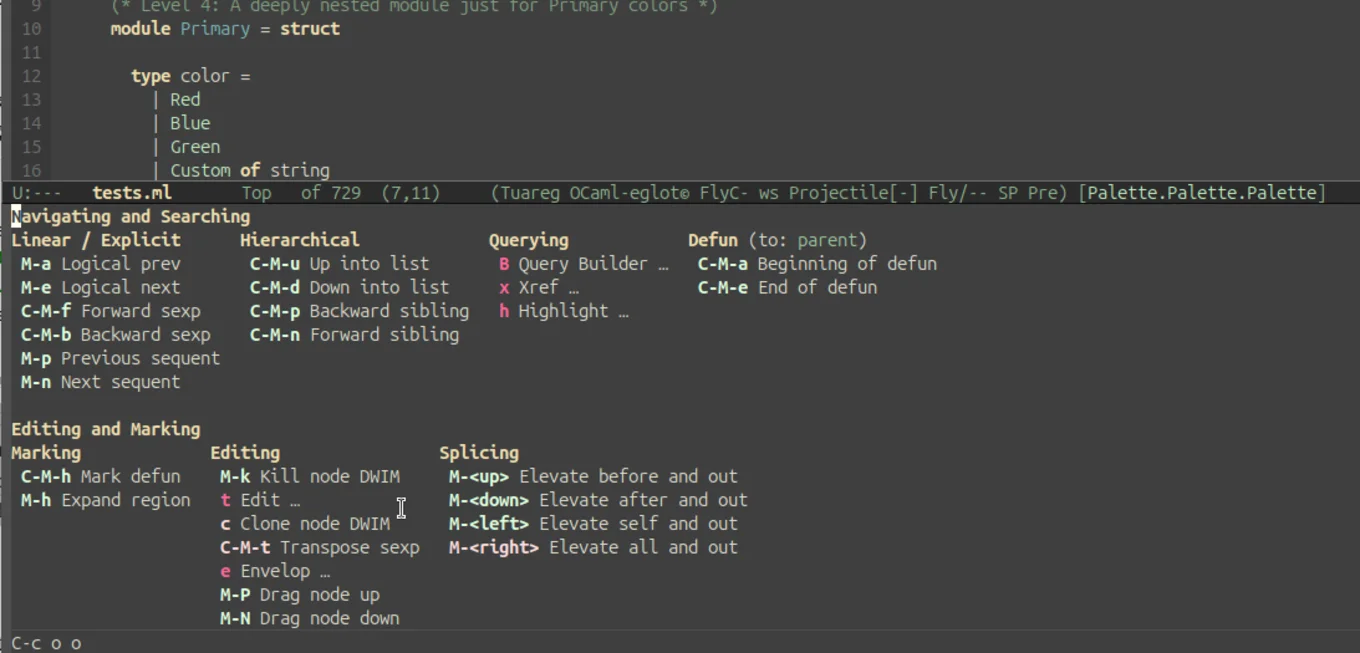
Once Combobulate is active in your OCaml buffer, you should see a © in the mode line. There is a Magit-style transient UI bound to C-c o o that lists every binding, which is handy while you're learning. To inspect the full keymap directly, run M-x describe-keymap RET combobulate-key-map.
With Combobulate, you have different commands to navigate your code in a variety of ways: jumping between siblings, jumping between occurrences of words, traversing the node tree sequentially, and more.
Navigation Commands
| Binding | Summary | What it does |
|---|---|---|
| C-M-u / C-M-d | Up/Down into list | Move in/out to the parent/child node. |
| C-M-n / C-M-p | Forward/Backward sibling | Move to the next/previous sibling at the current level. |
| M-e / M-a | Logical next/previous | Jump to the next/previous logical node, regardless of nesting. |
| M-n / M-p | Sequence navigation | Move between paired sequence points (e.g., jumping from the word let to the next occurrence of let). |
| C-M-a / C-M-e | Move to the start/end of defun | Move to the beginning/end of defun. This is based on best-effort. In nested let bindings, it doesn't work very well. |
Navigation Examples
A) Simple Examples
-
Navigating down into a body (C-M-d)
"Down" means entering whatever node the cursor is sitting on. The clearest case is descending from a module declaration into its contents:
module Counter = struct
  let value = 0
  let bump x = x + 1
end
Place the cursor on
module. Press C-M-d thrice and the cursor moves tolet value = 0. Press C-M-d again and you descend further, into the binding itself. -
Navigating up to the parent (C-M-u)
"Up" is the inverse: leave the current node and land on its enclosing parent. Suppose the cursor is on the number
100inside a record:let player = { name = "Ada"; score = 100 }C-M-u jumps to the whole field
score = 100. Press it again to land on the record{ ... }. To move from100directly to theletkeyword, use C-M-a. -
Navigating siblings (C-M-n / C-M-p)
Siblings are nodes at the same level, like match cases, tuple components, record fields, and array elements. Take a
matchexpression:match shape with | Circle r -> pi *. r *. r | Square s -> s *. s | Triangle (b, h) -> 0.5 *. b *. hPlace the cursor on the first match arm (
Circle r -> ...). C-M-n moves toSquare s -> .... Again toTriangle .... C-M-p walks back.
B) Complex Examples
Using only parent-child or sibling navigation is not always sufficient to navigate OCaml code efficiently. Because OCaml's deep nesting can lead to highly nested concrete syntax trees, you need a few more tools in your belt to avoid getting stuck.
-
Example 1: Using next-sequent (M-n) and prev-sequent (M-p)
In subsequent
let...inbindings, parent-child/sibling navigation is insufficient and unreliable due to howlet...inis represented as deeply nested subtrees in the tree-sitter grammar. Each successive binding is actually a child of the one before it, meaning C-M-p won't walk backwards up the chain. Instead, use sequence navigation to hop directly from oneletto the next and back.let emit_string_table_section fmt section_name (table : Dwarf_write.string_table) = let buf = Buffer.create 64 in let contents = Buffer.contents buf in let i = ref 0 in let len = String.length contents in while !i < len do let start = !i in while !i < len && contents.[!i] <> '\x00' do incr i done; let s = String.sub contents start (!i - start) in emit_asciz fmt s; if !i < len then incr i doneIf we want to move from the let-binding on line 3 to the let-binding on line 6, sequence commands M-n and M-p let you jump forward and backward easily.
-
Example 2: Using logical-next (M-e) and logical-prev (M-a)
if (x = 1) then true else falseWhen the cursor is on
if, you can do C-M-d to go to the parenthesis(, then C-M-d again to enterx, or C-M-n to go tothenandelse.However, if we have the same code without the parenthesis:
if x = 1 then true else falseThere is no direct sibling relationship to go from
xtothenusing C-M-d or C-M-n. In this case, we uselogical-next(M-e) to cross the operator boundary and jump directly to thethenbranch.Logical next/prev allows you to move to the next node in the tree irrespective of their parent/sibling relationships. It is also incredibly helpful for passing over
->,=, and other operators. -
Example 3: Escaping Deep Subtrees
If you are at the end of a long top-level item and want to navigate to the beginning of the next top-level item, use logical-next (M-e). If you try to use forward sibling navigation (C-M-n) from the end of the item, the cursor won't move at all since you are deep inside a nested subtree with no siblings to your right. Using M-e lets you jump out of the subtree instantly to the next top-level construct.
Editing Commands
Because Combobulate's editing commands are built on top of its navigation primitives, particularly sibling navigation, they all work in OCaml without any extra configuration. If you can navigate between two nodes, you can edit them.
| Binding | Summary | What it does |
|---|---|---|
| C-c o e | Envelope prefix | Apply a code template (envelope) at the cursor. Press C-h after to see what's available in this context. |
| M-h | Expand region | Mark the current node. Repeat to expand the region to the parent iteratively. |
| C-M-h | Mark defun | Mark the current enclosing defun. Repeat to expand to the next enclosing defun iteratively. |
| M-N or M-S-n | Drag forward | Swap the current node with its next sibling, preserving formatting. |
| M-P or M-S-p | Drag backward | Swap the current node with its previous sibling. |
| C-c o c | Clone node dwim | Duplicate the node at cursor. If ambiguous, you cycle through candidates with a live preview (the carousel). |
| C-c o t | Place cursors | Place multiple cursors (or field-editor fields) at every related sibling; e.g. each element of an array, each field in a record. |
Editing Examples
-
Expanding the region (M-h)
Each press grows the selection to the next syntactic unit. Starting on
rinside a function call:let area = pi *. r *. rM-honce → selectsr.M-hagain → selectspi *. r *. r.M-hagain → selects the wholeletbinding.
M-hdisplays numbers indicating where the next enclosing region starts, helping you visualize where the cursor will move if you perform a hierarchy-up navigation. -
Expanding an envelope (C-c o e)
Envelopes are context-aware templates. Press C-c o e then C-h to see what's available.
For example, to add a module template:
-
Place your cursor where you want to add the template.
-
Press C-c o e to list all available templates.
-
Press M to activate the modules template.
-
The template will be added with
nameas an editable hole:module name = struct end -
Press TAB to jump between holes.
-
-
Adding multiple cursors (C-c o t)
Cursors land on every sibling at the current level. This is perfect for bulk-editing collections. Place the cursor on any element of an array:
let primes = [| 2; 3; 5; 7; 11 |]Press C-c o t t and a cursor is placed on each element. Anything you type happens to all five at once!
-
Swapping siblings — drag forward / backward (M-N / M-P)
Drag transposes the node at the cursor with its neighbor, preserving formatting. Useful for reordering elements or record fields:
let primes = [| 2; 3; 5; 7; 11 |]With the cursor on
2, press M-N (or M-S-N) to swap them:let primes = [| 3; 2; 5; 7; 11 |] -
Cloning a node (C-c o c)
Duplicates the node at the cursor. On a record field:
type user = {
  name : string;
  age  : int;
}
Place the cursor on
name : stringand press C-c o c to duplicate it seamlessly.
Inspection & Search
| Binding | Summary | What it does |
|---|---|---|
| C-c o B q | Query builder | Open the interactive tree-sitter query builder, with completion and highlighting, for ad-hoc searches and bulk edits. |
Query Builder Example
Open a live tree-sitter query builder with C-c o B q. If you have value_definitions in your file, you can underline all of them with a blue line using the query:
(value_definition) @hl.blue.underline
Setup
Since Combobulate is built on tree-sitter you will need Emacs 29 or later, as that's when built-in tree-sitter support landed. Install Combobulate from the master branch and add the OCaml grammars to your config file.
To get started with OCaml, add the OCaml grammars to your config file:
(setq treesit-language-source-alist
      '((ocaml . ("https://github.com/tree-sitter/tree-sitter-ocaml"
                  "v0.24.2" "grammars/ocaml/src"))
        (ocaml_interface ("https://github.com/tree-sitter/tree-sitter-ocaml"
                            "v0.24.2" "grammars/interface/src"))))
Run M-x treesit-install-language-grammar for each.
Combobulate can be used with either neocaml-mode[1] or tuareg-mode[2] as your major mode. When it's working you'll see © in the mode line, and C-c o o opens the full command palette.
Try it out
Open up a project you are working on. Place your cursor on a case in a match expression and try to teleport to the next sibling.
You can check out the PR adding OCaml support in the Combobulate repo to explore the implementation process in more detail.
Feedback Welcome
OCaml's syntax is flexible enough that there isn't always one obvious answer to "what should the next sibling be?" or "what counts as descending one level?". We had to make judgment calls on a number of corner cases, like what sibling navigation does inside a type ... and ... block, how hierarchy behaves around functors, where sibling navigation should land in deeply nested expressions. We're happy with the choices we made, but we know they won't match everyone's expectations perfectly. If something feels off in your workflow, or you think a particular movement should behave differently, we'd like to hear about it. Open an issue on the Combobulate repo, make a post on Discuss, or contact us to let us know.
Stay in touch with us on Bluesky, Mastodon, and LinkedIn or sign up to our mailing list to stay updated on our latest projects. We look forward to hearing from you!
-
Please note that there is an open issue regarding
↩︎︎neocaml-modeintegration: bbatsov/neocaml#49. -
If you use
↩︎︎tuareg-mode, you will need the tuareg bridge. See the footnote about tuareg in the Combobulate README for more details.
Open-Source Development
Tarides champions open-source development. We create and maintain key features of the OCaml language in collaboration with the OCaml community. To learn more about how you can support our open-source work, discover our page on GitHub.
Explore Commercial Opportunities
We are always happy to discuss commercial opportunities around OCaml. We provide core services, including training, tailor-made tools, and secure solutions. Tarides can help your teams realise their vision
Stay Updated on OCaml and MirageOS!
Subscribe to our mailing list to receive the latest news from Tarides.
By signing up, you agree to receive emails from Tarides. You can unsubscribe at any time.